CONSTANT / EQ FIX TECHNOLOGY
Balance the tone.
A muddy or nasal quality.
Too much weight in the lows.
EQ tailored to your recording corrects the tonal imbalance that stays with your voice.
Explore EQ Fix ↗
AMATERAS JAPAN / VOCAL AUTO ONE
One plugin. Twenty seconds.
EQ, de-essing and compression.
Just play your recorded vocal and press LEARN.
AMATERAS VOCAL AUTO ONE
Automatically analyzed and set for your voice.
Tame muddiness, harshness and boom.
Get a vocal you can use in your song.
01 / TWO WAYS TO CARE FOR YOUR VOICE
CONSTANT / EQ FIX TECHNOLOGY
A muddy or nasal quality.
Too much weight in the lows.
EQ tailored to your recording corrects the tonal imbalance that stays with your voice.
Explore EQ Fix ↗MOMENTARY / VOCAL GENTLER TECHNOLOGY
A sharp S.
A sudden burst of low-mid boom.
Reduce them only when they get too strong, then release. Keep the brightness of the rest of the voice.
Explore Vocal Gentler ↗Different problems. Different processing.
One LEARN pass sets up both.
02 / THE ORDER MATTERS
If a sharp S drives the EQ decision, the rest of the vocal can lose its brightness.
Vocal Auto One first tames harshness and boom, then analyzes that smoother voice to set the EQ.
Momentary peaks do not pull the EQ toward excessive cuts.
Two technologies, working in the right order.
03 / LEARN 20s
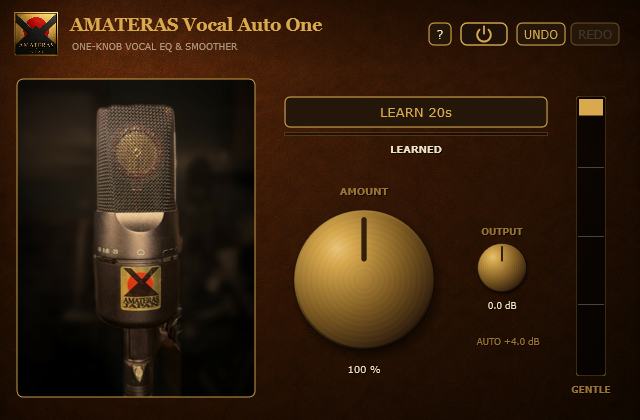
Insert Vocal Auto One on your recorded vocal track, before other EQs and compressors.
Choose a section with singing, press LEARN 20s, and keep the vocal playing for 20 seconds.
When LEARNED appears, setup is complete. Leave AMOUNT at 100% for a balanced, usable vocal.
Only turn the knob if you want a different amount.
You can leave it exactly as it is.
04 / SAME LEVEL. HEAR THE DIFFERENCE.
A little louder can sound a little better, even when it is not.
Vocal Auto One automatically compensates for the level difference between processed and bypassed audio.
Stop turning the knob, and the gain stays fixed.
The automatic level compensation does not ride the volume during playback.
Click the microphone photo in the plugin to switch processing on or off. Compare the tone and smoothness at matched levels.
The panel photo shows a real AMATERAS JAPAN microphone.
It also acts as the bypass switch.
05 / MAKE IT YOURS
Vocal Auto One takes care of the essentials.
If you want to add your own character, go a little further.
A little brighter. A little warmer.
Explore the plugin ↗Body.More cohesion and presence.
Explore the plugin ↗Texture.Analog warmth and a tactile richness.
Explore the plugin ↗You do not need them all.
Just add what your song calls for.
AMATERAS VOCAL AUTO ONE
Let it hear your recording.
Leave it at 100%. Bring it into your song.
USER GUIDE / SPECIFICATIONS / SUPPORT
GENTLE uses two-band dynamic processing to catch high-frequency sibilance and low-mid to midrange boom. During playback, it reduces these frequencies only when they become too strong.
EQ analyzes the voice after GENTLE processing and sets a correction toward a natural, pink-noise-referenced balance. It includes a low cut below 150 Hz. The EQ curve is set by LEARN and remains fixed during playback.
AUTO measures the 20-second learning passage using BS.1770 loudness measurement and matches processed and bypassed levels. Compensation updates when you adjust AMOUNT, then stays fixed when you stop. Bypass removes both processing and compensation. AUTO +4.0 dB in the panel is an example readout.
You can run LEARN again whenever you need to. UNDO and REDO provide 20 steps. Learned settings are saved in your DAW project.
If there is insufficient vocal audio, NOT LEARNED appears and existing settings are preserved. Hover over the message to see why.
Drag a knob to adjust it; hold Shift for fine control. The mouse wheel changes AMOUNT in 1% steps and OUTPUT in 0.1 dB steps. Double-click AMOUNT to return to 100%.
Click the microphone photo or power button to bypass processing. Bypass is linked to the DAW and switches without clicks. The ? button opens the product page.
Installers are provided as .exe for Windows and .pkg for Mac. On Mac, double-click the .pkg installer. If Windows SmartScreen appears on first use, follow the included README.
No license activation is required. Install the plugin and load it as an effect in a compatible DAW.
One license covers multiple computers you personally own. Sharing or transferring the license to another person is not permitted.
Contact support ↗